Are you new to karaoke in Japan and want to know where to start? Or perhaps you’re a regular karaoke-goer who wants to be sure you’re making the most out of your time and money? Either way, I hope this post will have something for you! As for my credentials, I am now in my fourth year of living in Japan, and I go to karaoke at least a few times each month (except for August of 2024, in which I went a whopping 9 times? Hello???). I certainly don’t claim to be an expert, but I have accumulated many tips and tricks during my hours at karaoke that I’d like to share with you all.
Karaoke Box Basics
First of all, let’s cover the basics. There are multiple forms of karaoke in Japan, but the one we’ll be discussing today is the private-room “karaoke box” or “karaoke booth” style. The main karaoke box chains in Tokushima are Manekineko, Big Echo, Kinkonkan, and Kaikatsu Club (Kaikatsu club is actually a net café with manga to read etc., but some of them have private karaoke rooms that are designed for small groups and are relatively cheap). There is also karaoke available at Round One in Tokushima City. Unfortunately, the larger karaoke chains are concentrated mostly in the city, but there are still some options in other areas. To search near you, I recommend checking the Karaoke Box Association’s Tokushima page here for a list of member stores. This Association vets the stores on its list, so they should all be decent places (although I haven’t personally been to all of them to verify, so don’t sue me if not).
Now, I should be transparent and state for the record that I am a loyal Manekineko-goer, despite it being one of the more expensive chains. There are a few reasons for this:
- As far as I know, Manekineko is the only large chain that allows you to bring outside food and drinks in, which can help cut costs
- Since they are a reputable nationwide chain, the stores don’t (usually) feel sketchy
- There are multiple locations easily accessible to me
- They have a good (and free!) membership system* that gives you discounts as you accumulate visits/points. I reached Platinum membership level last year, which gives you a 20% discount on everything. When going with a large group, this could easily mean a discount of 5,000 yen or more. Unfortunately, you get knocked back a level every April, so I’m back down to Gold, which gives a 15% discount. Still, it usually totals out to a few hundred yen off per person. *You have to download the Manekineko app from the Japanese app store to join the membership program.
Checking in Checklist
Once you’ve chosen your location and made your way there, check in at the reception counter. First, you’ll likely be asked how many are in your group and how long you would like to use the room for. Pricing is set by 30 or 60-minute increments. Additionally, many places offer a “free time” option, which means that you pay one set price and can stay for as long as you like. Of course, they can’t actually let you stay forever, so it usually cuts off the next morning or that evening. For example, free time at Manekineko is from 11am-8pm if you enter before 5pm, or 6pm-6am if you enter past 5pm. Be aware that even if you choose free time, most places will only “guarantee” three or four hours. After that, if they have a line of people waiting for a room to open up, they will call the phone in your room and politely ask you to leave (I think this has only happened to me like once). Here’s a tip from me to you: At most places, free time is usually only a better deal if you’re going to stay for longer than three hours. If you’re just looking to do a short karaoke session, it’s probably going to be cheaper to just pay for the hour or two. Do the math and figure out the best deal for your karaoke needs.
As a side note, almost all karaoke places will have you pay when you leave, but ever so rarely one will want you to pay upfront. If you have to pay upfront, you normally cannot extend your time after the fact. However, if it’s a pay-when-you-leave system, unless the place is absolutely packed with people waiting for a room to open up, you can usually extend your time by increments of 30 minutes by calling or asking at the front desk. Either way, when you do pay, don’t be surprised if you’re made to pay all at once when going as a group. It’s increasingly rare that karaoke places will let you split the bill and pay individually, so be ready to bust out your calculators.
Next, you may be asked if you have a preference for what kind of karaoke machine your room is equipped with. Some places may not ask this if, for example, they only carry one kind of machine, or most of the rooms are full. In general, however, there are two big names in the karaoke machine world: Joysound and DAM. Frankly, both types are going to work just fine, so don’t stress too much. Which to use mostly comes down to personal preference. Some people prefer the UI of one type versus the other, some people think the scoring system (we’ll get to that in a minute) of one is stricter or more lenient, etc. As for the song options, Joysound has a larger song library overall, but DAM is considered by many to have a better English song library. However, you should mentally prepare yourself that whichever system you use, they’re likely only going to have the hits—your favorite niche indie band is probably not going to be on either Joysound or DAM.
Finally, depending on the chain, you’ll usually be asked if you want to do the unlimited soft drink bar option or order drinks individually (this is often called the “one drink” option). Whatever you choose, it generally needs to be uniform throughout your whole group; if one person wants the drink bar, everyone has to order the drink bar. Just FYI, the drink bar will only have soft drinks, so if you want an alcoholic drink it’ll have to be ordered separately. Actually, some karaoke places offer all-you-can-drink alcoholic drink plans as well, so do inquire if you’re interested. However, be warned that if you get too drunk and puke in the sacred halls of Manekineko, you’ve angered the karaoke gods, and I’ll never forgive you.
If the store you’re at has a membership system, they will ask you to present your QR code or membership information. Membership is usually not a requirement, so just say you don’t have an account if that’s the case. Additionally, you may be asked how many people in your group are over 20 years old, and if anyone in your group is going to be drinking alcohol. Once all that is over, the attendant will hand you a receipt that tells you what room you’ve been assigned to as well as cups if you ordered the drink bar. You can now (finally!) make your way to your designated room and get singing! Make sure you have the correct room by checking the number outside the door before waltzing in, as intruding on a stranger’s karaoke session is generally frowned upon.
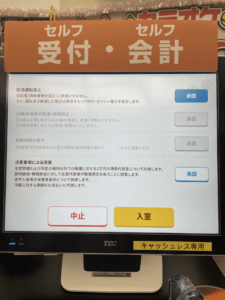 As an aside, some places now have self-check in via touch screen terminals. If there are not foreign language settings, Google Translate’s camera translator should be of help. Otherwise, there’s normally a bell you can ring at the front desk to call an attendant to help. Even when an attendant is assisting you, you may have to fill in some information on the screens at reception. For example, at Manekineko you will usually be asked how many people in your group are over 20 years old and if you’ll be drinking alcohol on the touch screen. If you answer that members of your party will be drinking alcohol, you may have to agree to an additional statement about not giving alcohol to minors, not operating a vehicle while under the influence, etc.
The screen asking you to agree to not drinking if you’re going to operate a vehicle, not give alcohol to minors, not dirty the room, etc. Press the 承認 buttons on the right of the screen to agree to the terms.
Using the Room
Alright! You’ve finally made it into the karaoke room. What do you do now?! For starters, if you chose the “one drink” option, they will generally want you to order those right away, so take a look at the menu and put in everyone’s orders via app or by calling with the phone in your room. Be aware that when you’ve chosen the “one drink” plan, if 15-20 minutes have passed and you still haven’t ordered them yet, in some cases they will actually call your room to request that you do so. For the drink bar, you can just bring your cup to the drink bar closest to you and fill up whenever you want. Some karaoke places also have food menus that you can order off for an additional charge via the tablet, app, or phone.
Aside from that, you should also set the room’s lighting and temperature to your liking. The temperature settings will either be on a remote control or panel built into the wall. It’s important to be comfortable so you can sing your heart out with no distractions!
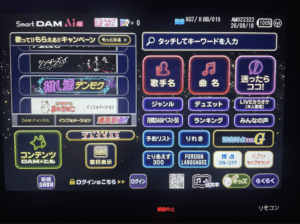
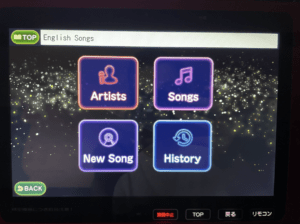 Next, it’s time to get the karaoke machine ready to go. Take the tablet and microphones off their chargers. If you struggle with reading Japanese, you can first change the language setting on the tablet. Usually there will be a button that says “foreign languages” in English, or a button that looks like a sphere? globe? type of round thing. By pressing this, not only will it change the entire UI to that language, but it will also take you to that language’s music catalogue. However, depending on the tablet, you should still be able to search for music in different languages.
The Dam home screen. Press the foreign languages button to get to the foreign language music catalogues.
You can either search for songs by song title, artist name, keyword, and sometimes lyrics. If you’re not having any luck finding a song by searching the song title, I recommend switching gears and trying to search for the artist’s name. Sometimes the English input gets funky, or a song will only appear if you search for it in katakana, etc.

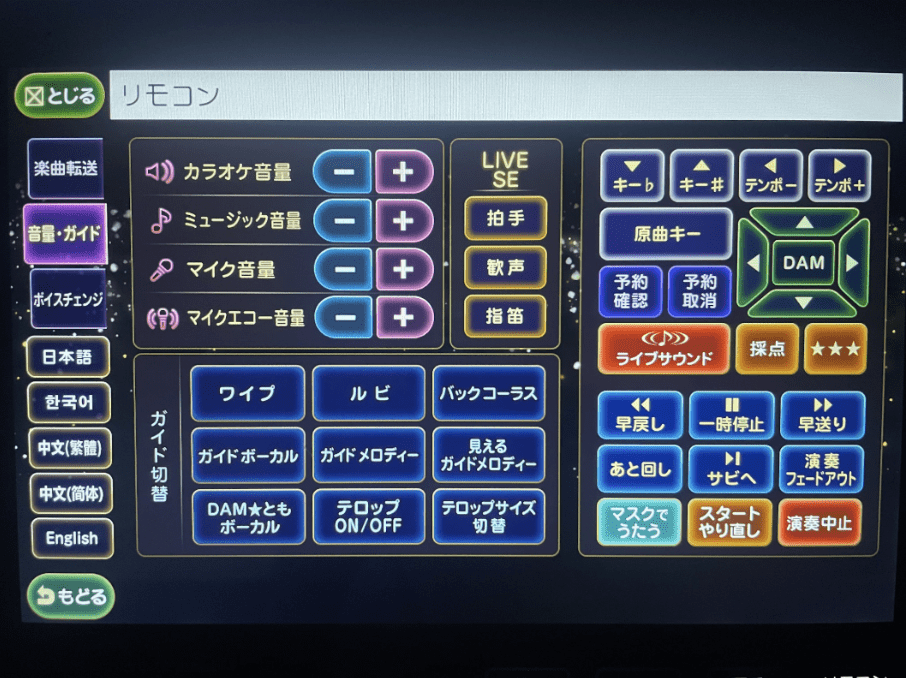 At this point you can also adjust the volume settings. Give a song a test run and see how it feels. Is the music too loud? Is the mic volume too low? Is the echo too much? Adjust these from the settings menu (usually called リモコン on DAM, or 音量/操作 on Joysound). It can switch to another language if you need it to.
Dam’s リモコン menus. You can change the language for the settings screen to English by pressing the button in the bottom left corner.
Other settings that can help you get the most out of your karaoke are:
- 採点 or the scoring system – Honestly this is such a game changer for karaoke in my opinion. There are many different types of 採点 modes, but the general idea is that the machine will keep track of your pitch accuracy, rhythm, stability, and technique, and give you a score out of 100 at the end of the song. Some modes will even tell you how you compare versus other people who have sang that same song. Not only is it fun to see how you perform, but I also think it’s a great way to improve your singing over time. It should be noted, however, that scoring systems only measure mechanics, and can’t take into account emotion, expression, etc. All I’m saying is, sometimes the best performance is one you put all your emotions into, which doesn’t always mean being perfectly on pitch. Try not to give too much weight to the scores, and I think you’ll have a great time!
- 見えるガイドメロディ or “Visible guide melody” – If you like to see the melody as well as the lyrics on screen, you can turn this option on. It will tell you which notes you hit and which you miss, but unlike the scoring mode, it doesn’t give you a score at the end. I like using this option if there’s a song I know most of but am still a little unclear on the melody at some parts.
- ガイドメロディ or “guide melody” – This is a melody that you can hear that will play along with the music. Some people find it helpful, some people find it annoying. It’s usually on by default, so make sure to turn it off if you don’t want it for a particular song.
- ワイプ or “lyrics scroll” – You know how in karaoke, as you’re supposed to sing the lyrics, they turn a different color on the screen? This is called the lyrics scroll, or at least that’s what I call it. Sometimes the timing can be slightly off, especially for English songs, which bothers some people (me). If you’d like to turn this off entirely, find the ワイプ button in settings. Sometimes it’s hidden in the テロップ (telop) menu.
- ルビ or furigana for kanji – I believe furigana is turned on by default, but if it’s not and you would like the hiragana readings for kanji, find this button.
- 後奏カット or outro skip – Found in the 演奏フェードアウト (performance fade out) menu on DAM tablets, or the the “曲の長さ” (song length) menu on Joysound, this setting will cut a song off after all the lyrics in it have been sung. This helps trim down time spent on long instrumental outros. Your precious karaoke time is limited, after all.
- キー# and キー♭ or key up (sharp) and key down (flat) – With these buttons you can change the key of the song up or down to match your vocal range. It may be hard to get the hang of at first, but this is a great tool that can allow you to sing songs that would normally be out of your vocal range.
- 原曲キー or original key – Sometimes if a song is in an especially high or low key, the karaoke machine will make the “default key” one that is easier to sing for most people. If you want to sing the song in its original key, press this button.
- 予約リスト or “queue” – This button is actually usually on the main screen of the tablet, not in the settings menu. From here, you can check your queue of reserved songs, as well as change the order of what’s coming up next.
Bonus Tips!
Here are some other various tips:
- Pricing at karaoke places often depends on the day of the week and time of day. Most places will follow this general order, from cheapest to most expensive:
- Mornings any day
- Mon-Fri afternoons
- Weekend + holiday afternoons
- Mon-Thurs nights
- Fri-Sun + the night before a holiday + holiday nights
- Some places, usually in city centers where they’re busier and wanting to keep rooms open, may not offer free time or may charge you extra if you are doing solo karaoke.
- Prices may be additionally raised during the Awa Odori period, New Years Holidays, school breaks, etc.
- If you order an all-you-can-drink alcohol option, be aware that there may be a limited menu (like beer, lemon sours, highball, chuhai, etc.) outside of which will cost extra.
- If you’re with a group and want to order food for yourself, keep track of the price of your order so you can pay the full price for it when checking out (food orders will get added onto the room’s tab).
- If you’re going to a place that allows it, bringing in snacks and drinks is often cheaper than doing the drink bar or ordering from the food menu. This is especially true if you are going to be drinking alcohol, as a 200-yen beer from the conbini may be 500+ yen off the karaoke place menu.
- If you’re going to be going even somewhat regularly, and your go-to place offers a membership system, consider signing up for it and taking advantage of any potential discounts.
- Use the 後奏カット or “outro skip” button to save time and get in as many songs as possible when you only have the room for a few hours.
- If you’re karaoke’ing with a group, it’s good etiquette to adjust the queue to alternate whose songs are up. For example, I may reserve 5 songs at once, but afterwards I would go into the queue and disperse them to be broken up by other people’s reserved songs. Try not to sing too many songs in a row by yourself if you’re with a group, unless the people you’re with are cool with it.
- If you find that you like DAM machines, I recommend you look into making a free DAM Tomo account. With this account, you can log in via the tablet in your karaoke room, and have it record songs in decent quality to listen back to later on your page from your smartphone. You can even publicize them for others to hear and “like” if you want. Anyone can feel free to get in touch with me if you have questions! (I swear I’m not sponsored, the service is free in the first place I’m just passionate about this okay).
- Similarly, Joysound has a phone app where you can make an account and save songs and artists you like. You can connect the app with the Joysound tablet in your karaoke room and reserve songs, change volume settings, etc. directly from your phone. I find I can type a lot faster on my phone than the tablet keyboard, so this app is super handy. It also saves your song history.
Okay, I think that about covers everything “karaoke” I can think of for now. For those of you who read this far, you’re a true karaoke-er. Now get out there and get singing!
